You ordered a card for a friend's birthday four days ago. The party is Saturday. When you open the order page, the status says Printing with a date from yesterday, and nothing on that screen tells you whether the card will land in a mailbox in time.
That uncertainty is the part of sending physical mail nobody prepares you for. Tracking order status for a greeting card doesn't behave like watching a food delivery creep toward your door. It moves in batches, it passes through hands you don't control, and each label means something narrower than it appears to. What follows is how to read each line on the order page, how to turn an arrival estimate into an actual plan, and what to do when the updates stop.
Table of Contents
- How to Find Your Card Order Status
- What Each Order Stage Actually Means
- Reading the Arrival Window and Timing Your Order
- When Tracking Stops Updating
- Decide What to Do Next With Your Card Order
How to Find Your Card Order Status
The order page is where the answer lives. Not the confirmation email, not your bank statement, and not whatever delivery app happens to be on your phone. Your order is attached to the account you used at checkout, and that page carries the most current information anyone has: the current stage, the date of the last update, and the arrival window you approved.
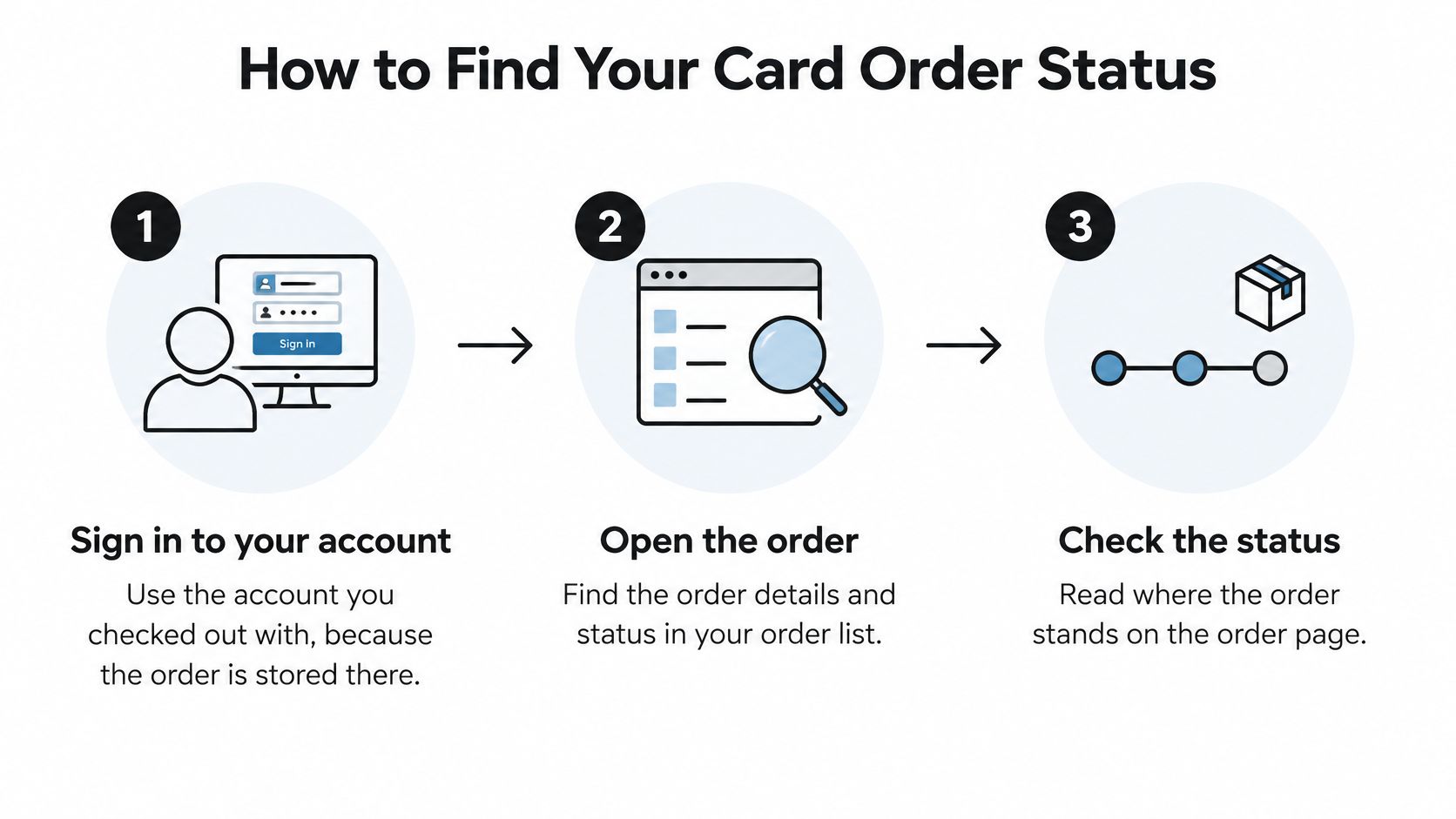
Steps to Get From Sign-In to the Real Status
- Sign in with the account you used at checkout. The order is stored against that account, so a second one created later won't see it.
- Open the order itself, not just the order list. The list is a summary. The order detail shows the status line, its date, and the estimated arrival window you agreed to before payment.
- Read the timestamp before the label. "Printing, updated Tuesday" tells you far more than "Processing" with no date attached, because it gives you something to compare against tomorrow.
- Follow the carrier tracking number to the carrier's own site if one appears. USPS shows individual scans with a time and a facility, which is finer detail than a single order status can offer.
- Write today's status and date in a note on your phone. Two lines is enough, and next time you look you'll know instantly whether anything moved.
- Recheck once a day. Production updates and postal scans arrive in batches, so refreshing every twenty minutes shows you the same line and costs you your afternoon.
Daily checking isn't laziness, either. In a study of online shoppers, 40% checked an item's order status at least once per day, slightly more than 10% checked multiple times daily, and 75% relied on email tracking numbers for their updates (State of Online Shoppers study). Once a day matches how the underlying systems report.
Practical rule: If the order page shows no carrier number, that page is your most detailed view. There's nothing further to unlock elsewhere.
What a Normal Check Looks Like
You'll see one of two things. Either the status advanced since your note, which means the order is doing exactly what it should, or it hasn't moved but still sits inside the estimated window. Both are fine, and neither requires an email to anyone. The moment to act is when the window has opened and the status is still frozen, and that's a different conversation.
If you're still sorting out the mechanics of the whole process, our guide to how to send a card in the mail covers everything that happens before an order exists.
What Each Order Stage Actually Means
The status line answers a narrower question than many assume. It isn't a location. It's an answer to: who currently has responsibility for this card, and what are they doing with it next.
That distinction matters to buyers. In 2025, 63% of U.S. consumers said full visibility throughout the delivery process was essential, according to KODIF's shipping and delivery experience statistics. Visibility only helps when the words on screen map to real hands and real obligations.
Who Is Holding the Card Right Now
Three parties touch your card: you, us, and the postal service. Before the handoff, any problem is a production problem and we can still act on it. After the handoff, movement gets recorded in postal scans, so a question about where the card is becomes a question about the scan record.
| Stage | What it means | Who controls it | What you can do |
|---|---|---|---|
| Approved | You confirmed the card, address and total | You | Nothing, the approved version is locked |
| Payment confirmed | The card is queued for production | Mail This | Wait for production to begin |
| Printing and packing | The card is printed, packed and addressed | Cardly, our production partner | Wait, no action needed |
| Handed to postal service | The partner has passed the card to USPS | USPS | Watch for the arrival window to take effect |
| In transit | USPS scans show movement between facilities | USPS | Check scan times, not just the label |
| Out for delivery | A local facility scan shows the card is on the route | USPS | Expect delivery that day |
| Delivered | A delivery or attempted-delivery scan exists | USPS | Ask the recipient, escalate only if missing |
Two rows carry most of the confusion. Handed to postal service is the boundary line: before it, your order page is the authority, and after it, the postal scan is. And Delivered means a scan exists, not that a hand touched a mailbox. Those are different claims, and the gap between them is where most "it says delivered but there's nothing here" messages come from.
Reading the Arrival Window and Timing Your Order
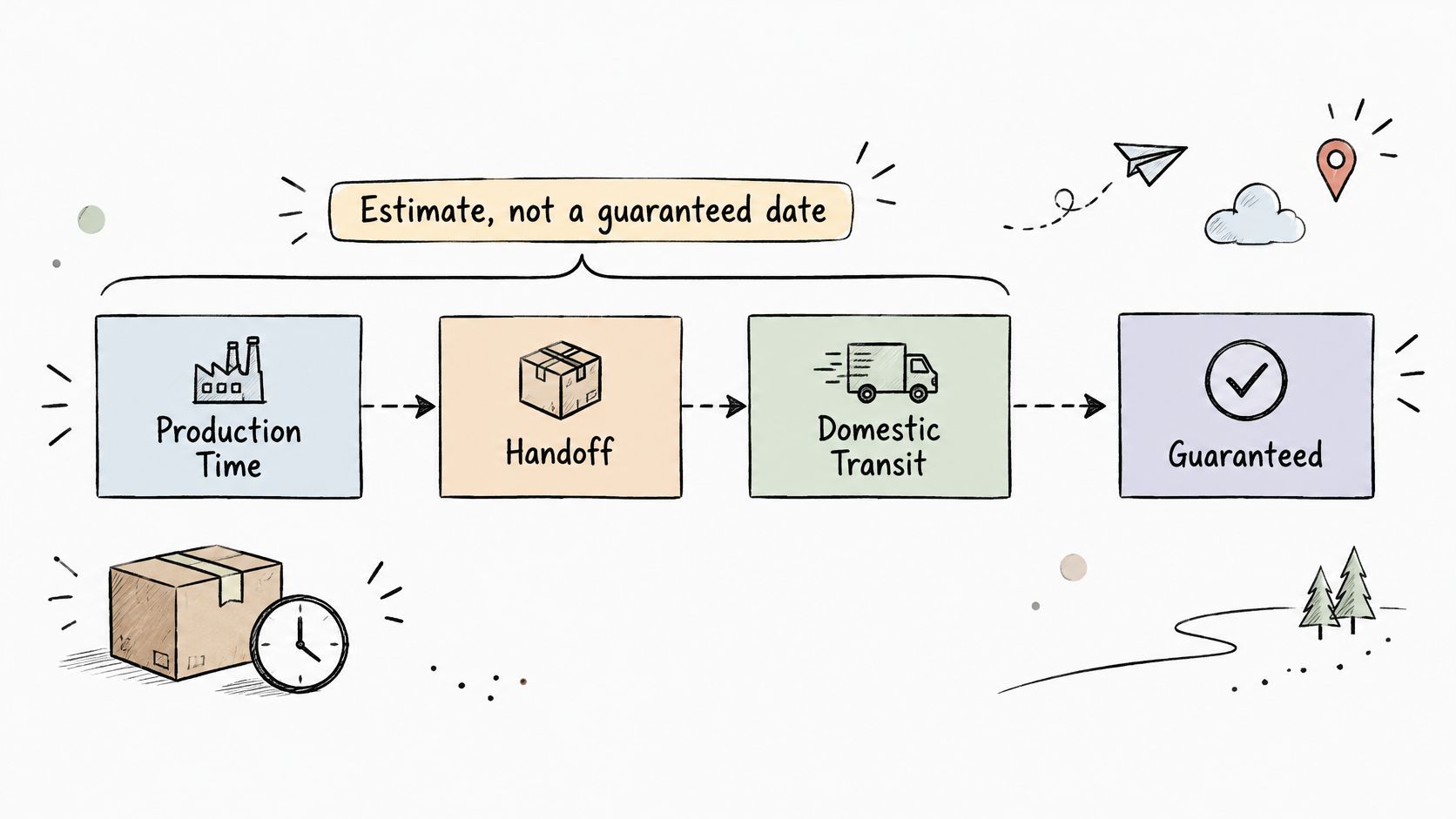
A Saturday birthday creates a planning problem. The card may be printed, packed, handed off and moving normally, while the still-open question is whether it reaches the mailbox before the party. The arrival window works like a planning fence. It gives you the practical range to work around, while a single promised date gives you a point you do not control.
The arrival window is the most useful number on the order page and the most frequently misread. It is an estimate, assembled from how long production usually takes, when the handoff happens and typical domestic transit for the destination. The arrival estimate is shown before payment, so you can compare it with the date that matters before you commit.
A window counts as a guarantee only when it is explicitly labeled one. A desired arrival date does not change the mailing service or guarantee arrival, and for anything tied to a specific day, build in extra time. Senders value clear arrival estimates because a card is tied to a moment, not just a delivery address. That practical need shapes how you should read the window: as a guide for decisions, not a promise that removes uncertainty.
USPS service performance is a useful reminder of why the window needs slack. Even strong results leave room for pieces that arrive later than the standard. Read the general point here, without treating any figure as a promise for a specific card: mail moves through production, handoff and postal transit, and each step can shift the final arrival. USPS fiscal 2024 Q4 package services performance gives context for reading postal performance, while the order page remains the place to read your own estimate.
Shoppers generally want estimated delivery dates because they are planning a real event. Clear estimates help because they turn “will it make it?” into a usable range. That same idea appears in a broad way in the Stord mystery shopping report: delivery clarity matters to the person waiting. For a card order, the estimate lets you decide when to send, when to tell the recipient and when to prepare a backup note.
A Worked Example of a Window Behaving Normally
Say you order on a Monday and the window runs to the following Friday. On Wednesday the status still reads Printing, which feels alarming and is normal. Production has not yet handed the card into postal transit, so the window still has room. On Thursday it flips to Handed to postal service, which means the card is now moving inside the window rather than at risk of missing it. It arrives Thursday or Friday and nothing went wrong at any point.
A window that slides later is the other common case. Usually, production took longer than the typical path, so every downstream step shifts with it. Handle a later window as updated information. It does not, by itself, mean the card is lost.
Plan Backward From the Window, Not the Order Date
- Fix the date the card must land. The birthday, the anniversary, the day you want the thank-you to arrive.
- Count backward to the start of the window. If the window begins on a Tuesday, that is the earliest the card can reasonably arrive, not the day you ordered.
- Plan to the end of the window, and past it for milestones. Birthdays, weddings and condolences deserve buffer, casual notes need less.
- Give the recipient a heads-up. A short “something's coming your way this week” without revealing the message keeps the surprise and removes the anxiety on both ends.
A card that shows up two days after the birthday still gets read and still gets kept. The risk worth managing is promising a specific day you do not control.
The Saturday birthday scenario catches a lot of people. You order for a party on Saturday, the window closes the Thursday before, and you text your friend that the card should arrive this week. That is the right move. If it lands Monday, a short note covers the gap and the card still does its job. For a fuller picture of typical timing, see how long it takes to receive a card.
When Tracking Stops Updating
The status hasn't changed in four days. There are three ordinary explanations: the card is still in production, it's been handed over but not yet scanned, or a scan was missed at a facility on the way.
A missed scan is a documented feature of the system. USPS states that tracking can include a delivery or attempted-delivery date, time and location, and also warns that a missing delivery scan does not prove non-delivery (USPS tracking basics). A tracking update works like a checkpoint in a relay: a skipped check-in leaves a gap in the record while the card keeps moving. A quiet status page is best handled as a planning problem, with a schedule for waiting and a fixed date for escalating.
The labels can also point in the wrong direction. In an audit of 500 observed packages by the USPS Office of Inspector General, 318 messages, or 64%, did not accurately reflect the package's observed location, time or date, and 163 packages were labeled out for delivery while still at the post office (USPS OIG package tracking messaging audit). Read the last verified scan time and place. When a status describes where a package is expected to be rather than where it was scanned, treat it as a forecast.
| Symptom | Likely cause | First action | When to escalate |
|---|---|---|---|
| No update after production should start | Order is queued or not yet submitted to the printer | Wait one full day and recheck | After the arrival window has started with no change |
| Status stuck at handed to postal service | USPS has not yet scanned the card | Recheck daily and read the latest scan time | After the window ends with no new scan |
| Delivered but recipient has no card | Scan may reflect an attempt or the wrong location | Ask the recipient, household and building staff | Contact support with the order number |
| Address check suggested a change you did not expect | The address was flagged during validation | Accept or correct the suggestion promptly; unconfirmed suggestions stay in browser memory for up to 15 minutes | Contact support if the address is still wrong |
| Card arrived damaged or different from the preview | Print or production issue | Take a clear photo of the card | Contact support within 14 days of delivery with the order number and photo |
The "delivered but missing" row needs a sequence rather than a single step. Check the scan time and place, ask the recipient and anyone else in the household, check with building staff or neighbors, and then come to us. While you wait, set a reminder for the day after the window ends. That gives you an escalation date decided in advance instead of an open-ended refresh habit.
The escalation clock: USPS advises customers to contact their local Post Office after more than one postal business day following a delivered scan when the item can't be found (USPS missing mail guidance). That's the threshold to act on, so past it you escalate rather than keep checking.
Decide What to Do Next With Your Card Order
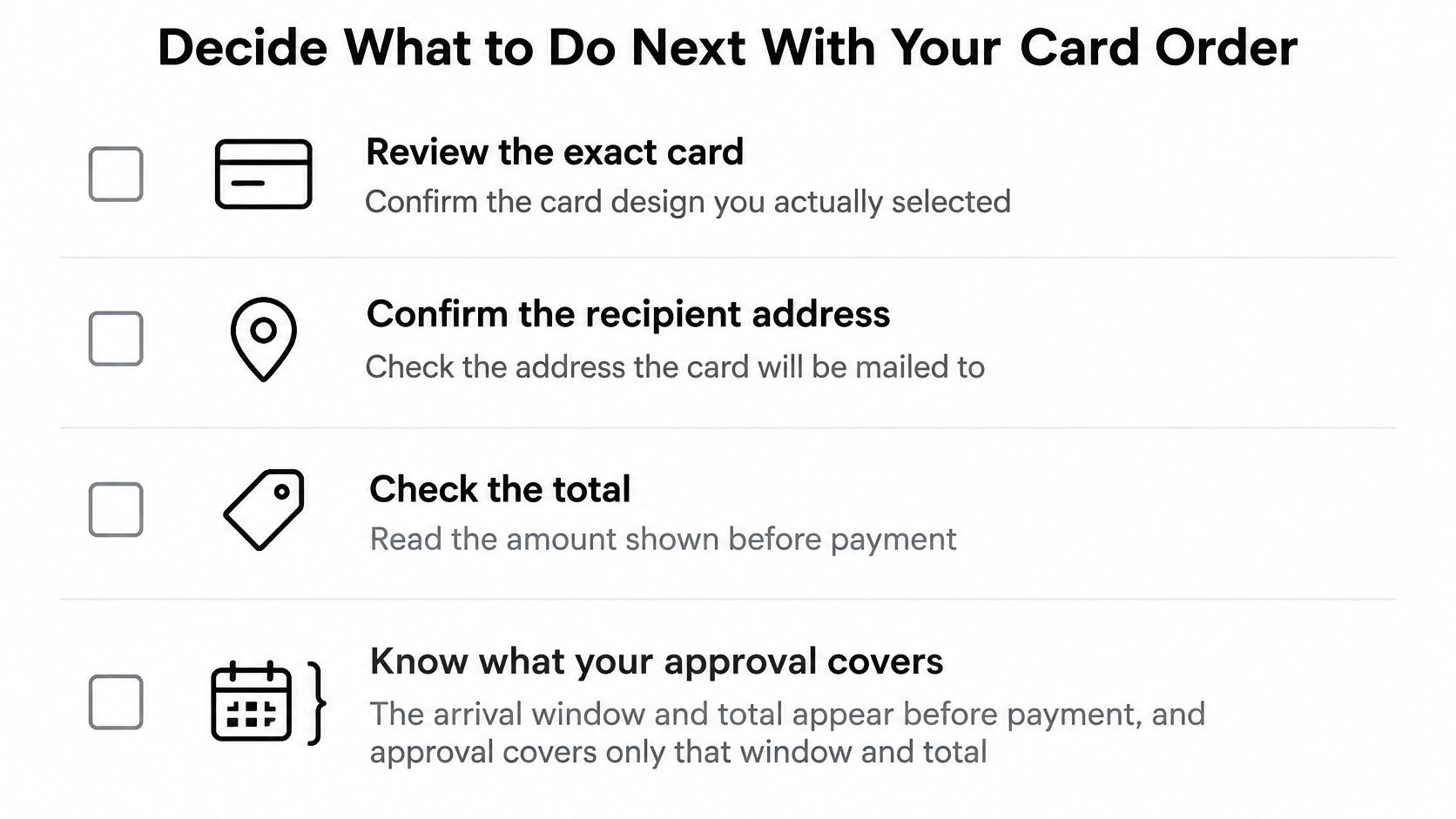
One check prevents most of the problems this article addresses, and it happens before you pay. The preview, the recipient address, the total and the arrival window all appear before payment (K1), and your approval covers only that exact draft version, price, recipient and window (K9). An address typo caught at that screen costs nothing. The same typo caught after handoff costs a card.
Cancellation follows the same logic. Before an order is submitted to the printer, you can cancel it with the cancellation button on its order page. After submission, cancellation depends on the provider and isn't guaranteed (K4). Payment is the key decision point, not the day you notice something is wrong.
If the card arrives damaged, misprinted or materially different from the approved preview, contact us within 14 days of delivery with the order number and a clear photo of the issue (K13), so support can act while the report window is open. The refund policy sets out how that process runs. A missing card is a separate path: use the escalation threshold above rather than the 14-day damage window.
Mail This turns a short, thoughtful idea into a real folded card, printed, addressed and mailed within the United States for $9.99 including postage. You approve the exact card, the recipient address and the arrival window before you pay, and the order page shows you where your card stands from approval through postal handoff. Start a card at Mail This and give yourself one less thing to guess about.