Americans still put billions of cards in the mail, even after a steep drop. A 2024 analysis by the U.S. Postal Service Office of Inspector General found that greeting-card volume, the largest category of personal correspondence, fell from 3.7 billion pieces in fiscal year 2008 to 1.7 billion in fiscal year 2023, a 54% decrease. That is not a vanished habit. It is a smaller, more deliberate one.
A mailed card earns its place when the moment can wait a little and the person would rather hold something than swipe past it. Speed favors a text. Emotional weight favors paper. The pages below show how to match the occasion, time the send, check the size, and approve the card before anyone prints it.
Table of Contents
- Why a Physical Card Still Reaches People
- Occasions Worth a Mailed Card and When to Send
- Choosing Physical or Digital for Each Card
- Card Size and Mail Rules That Affect Delivery
- How to Create and Mail a Card Step by Step
- Problems With a Card and How to Fix Them
- Choose Your Occasion and Send Your First Card
Why a Physical Card Still Reaches People
A personalized mailed card is a folded card with your own photo or generated art, a message you write and approve, and an envelope sent to someone else's address. A text arrives and scrolls away. The card can sit on a shelf or in a drawer, and it shows the time you spent choosing it.
The habit is still mainstream. The Greeting Card Association estimates that Americans purchase approximately 6.5 billion greeting cards annually, generating estimated annual retail sales of $7-$8 billion. Christmas is the most popular seasonal category, with approximately 1.6 billion Christmas cards purchased each year, including boxed-card purchases. Birthdays, anniversaries, thank-you notes, and everyday messages keep that buying steady, so a personal card is an ordinary choice, not a niche one.
The same association reported that Baby Boomers continued to buy the greatest number of card units, while Millennials had spent the most money on greeting cards since 2015. How often someone buys and how much they will pay for a more personal card are not the same thing. Name the occasion you have in mind before you pick a design. The send window depends on it.
Occasions Worth a Mailed Card and When to Send
Count backward from the day you want the card in someone's hands. Every lead time below is a planning estimate. You will see an estimated arrival window, not a guaranteed delivery date.
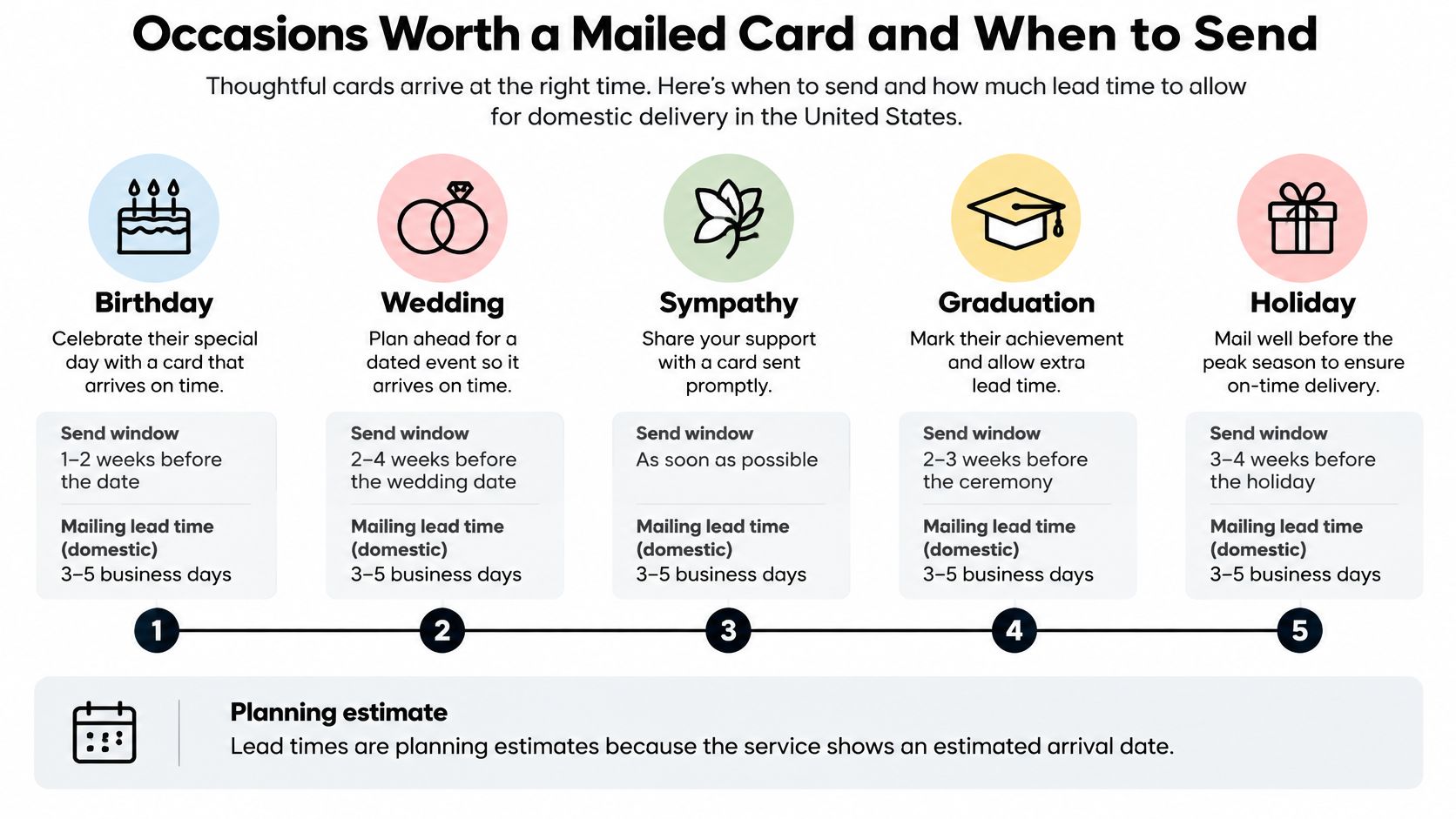
| Occasion | Send window | Allow for mailing | Tone to choose |
|---|---|---|---|
| Birthday | 1-2 weeks before the date | 7-10 days | Warm and personal |
| Thank you for a gift or favor | Within 1-2 weeks of receiving it | 7-10 days | Specific and grateful |
| Sympathy | As soon as you hear, within 2 weeks | 5-7 days | Quiet and brief |
| Get well | Early in recovery | 7-10 days | Light and encouraging |
| Anniversary or love | 1-2 weeks before the date | 7-10 days | Intimate and tied to a shared memory |
| New baby | Within 2 weeks of the birth | 7-10 days | Joyful and practical |
| Congratulations or milestone | Within 1 week of the news | 7-10 days | Celebratory |
| Mother's Day or Father's Day | About 2 weeks before | 10 days | Sentimental |
How to count backward
Pick the event date first. Subtract the mailing allowance, then add a buffer for a weekend or a holiday. Say a birthday falls on a Saturday and you are allowing 7-10 days. Approve the card about two weeks out, not the Monday before.
Sympathy and get-well cards are urgent in a different way. Mail them early, and don't rush the wording. A short, quiet note that leaves on day two is better than a long message that sits in drafts.
Seasonal dates fill up
Mother's Day shows what a peak looks like. In 2025, 72.6% of U.S. Mother's Day celebrators planned to purchase greeting cards, according to a survey of 7,948 consumers conducted by Prosper Insights & Analytics in cooperation with the National Retail Federation and reported by Northwestern University's Spiegel Research Center. Crowded dates slow both production and the mail. Use the "about 2 weeks before" row, and don't treat the holiday like an ordinary Tuesday.
Practical rule: If the card must land on the exact day, send a short digital note for the moment and let the mailed card follow.
Choosing Physical or Digital for Each Card
A wedding congratulations that has to land before noon tomorrow is a different job from a birthday note someone might keep for years. Urgency and emotional weight make the format decision. The rest of the row only checks that first call.
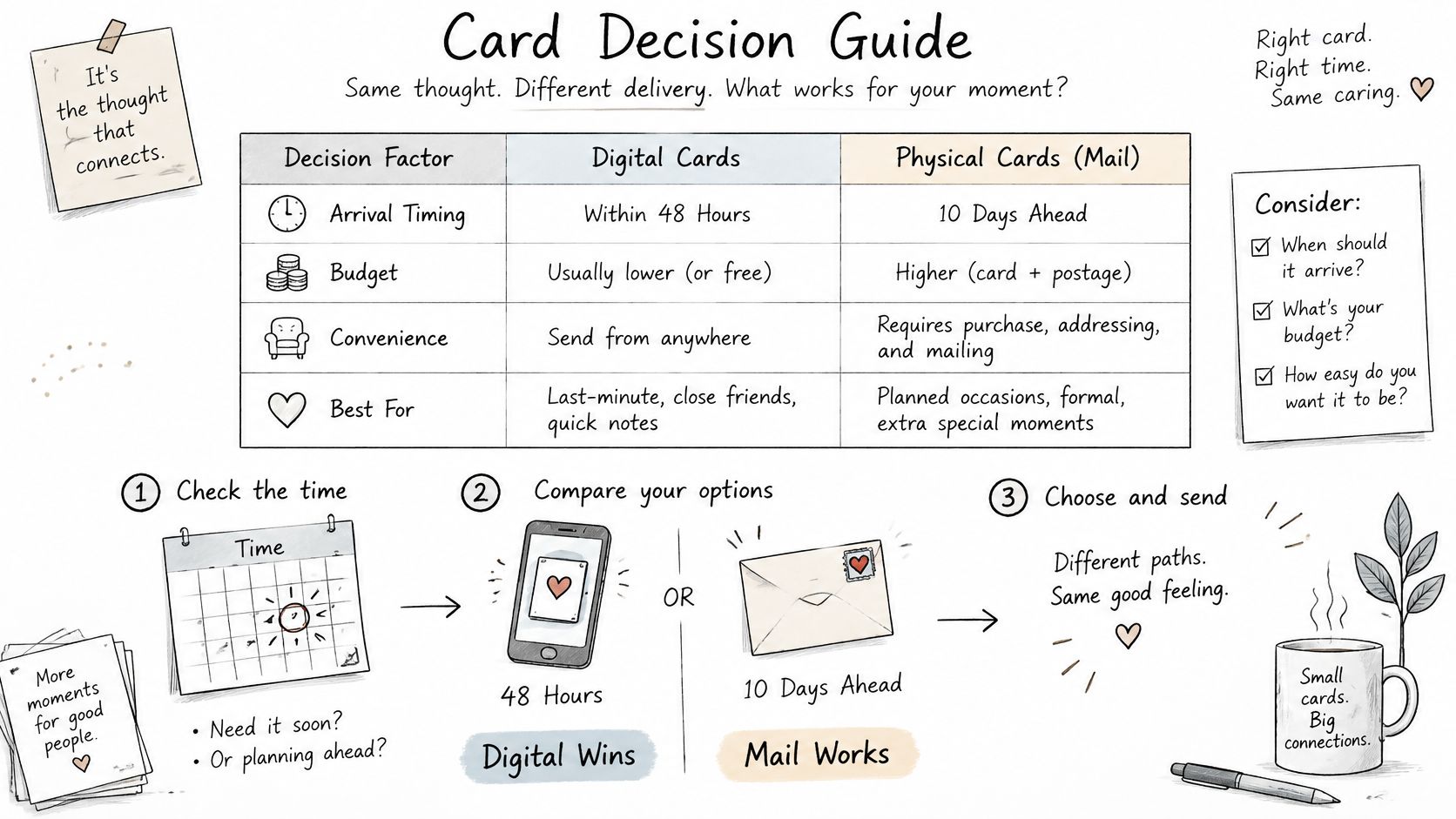
| Decision factor | Choose a mailed card | Choose a digital card |
|---|---|---|
| Time until it must arrive | More than 10 days away | Within about 48 hours |
| Emotional weight | Birthdays, sympathy, gratitude, milestones | Quick congratulations and casual notes |
| Keepsake value | Something kept on a shelf or in a drawer | Read once and then forgotten |
| Effort you want to show | A personal, deliberate gesture | A fast, low-effort reply |
| Address needed | Yes, a mailing address | Only an email or phone number |
When speed beats sentiment
If the note must arrive within about 48 hours, a digital card is the practical choice, even on a sentimental day. Wedding-morning congratulations that would miss the ceremony belong in a text or email, not a late envelope. If you can mail more than 10 days ahead, paper is realistic.
Digital cards are valued for instant delivery, easy sharing, and easy purchasing. A separate 2025 survey reported that two-thirds of U.S. adults preferred receiving physical cards, including 62% of Millennials and 59% of Gen Z, according to the Fiserv prepaid consumer insights survey.
Those preferences can sit in the same person. Use speed for a quick congratulations. Use paper for a birthday, a thank-you, or a condolence, where the card is meant to be kept.
Birthdays, sympathy, gratitude, and milestones carry more weight on paper because the object stays after the moment passes. A casual reply is usually read once. Would the recipient keep it on a shelf or in a drawer? If yes, mail it.
Paper also has a cost you cannot undo after printing starts. Approving the card first works like confirming a restaurant ticket before the kitchen fires the order. You choose a design, check the exact artwork and the delivery address, and only then pay. Catalog cards are reviewed before payment, and custom artwork must be approved before a card can be sent. The card is printed and mailed only after that approval and payment. Buying extra artwork generations does not approve or send anything, so a revision is not a surprise charge for postage.
If you want paper without building a design file, compare paperless post alternatives and keep that approval step in the path.
The short video below walks through that same timing choice, from a same-day note to a card you schedule ahead.
Card Size and Mail Rules That Affect Delivery
A folded card works like a booklet that still has to clear a postal doorway. Mail This uses a folded card of 125 × 175 mm, about 4.9 × 6.9 inches, in portrait or sideways orientation. You choose which edge stands tall. The two side lengths stay the same.
The long side decides the mail class. USPS letter-size guidance limits a letter to 11.5 inches in length, 6.125 inches in height, and 0.25 inches in thickness, and it limits machinable enveloped letters and cards to 3.5 ounces. The card's 6.9-inch side is over that 6.125-inch height, so the finished card and envelope are handled as a flat, with flat postage and machinability rules of their own. The piece sits outside letter-size, and it does not drop into the smallest card category on its own.
| Mail rule | Limit or planned value |
|---|---|
| Planned folded size | 125 × 175 mm (about 4.9 × 6.9 in), portrait or landscape |
| Letter-size length limit | 11.5 in |
| Letter-size height limit | 6.125 in |
| Letter-size thickness limit | 0.25 in |
| Machinable enveloped card weight | 3.5 oz maximum |
| Minimum thickness for machinability | 0.009 in |
Read the height row as the limit the card misses. Length is comfortable, because 6.9 inches is under 11.5. Thickness is separate. A machinable piece should be at least 0.009 inches thick, with even paper from edge to edge. Uneven lumps are what push a flat into a hand-sort bin.
Three checks before you approve
Approval is the gate that keeps a size mistake from becoming a paid mailing. You confirm the exact card, then you pay.
- Confirm the whole unit. Card, fold, envelope, inserts, and adhesive should stay rectangular, with square corners and even thickness.
- Leave bulky extras out. Ribbon, dimensional stickers, and glitter make the piece uneven and can force manual handling.
- Treat rotation as design, not a size cut. Portrait or horizontal orientation turns the artwork. It does not bring the 6.9-inch side under the letter height limit.
Postage is a separate question from these limits. The breakdown of what it costs to mail a greeting card shows the price once you know the piece is a flat rather than a letter.
Rectangular sides and even thickness are what keep a pretty card on a machine, instead of in a hand-sort bin.
How to Create and Mail a Card Step by Step
Each step exists so a wrong name, a fuzzy photo, or a surprise total never becomes a printed card.
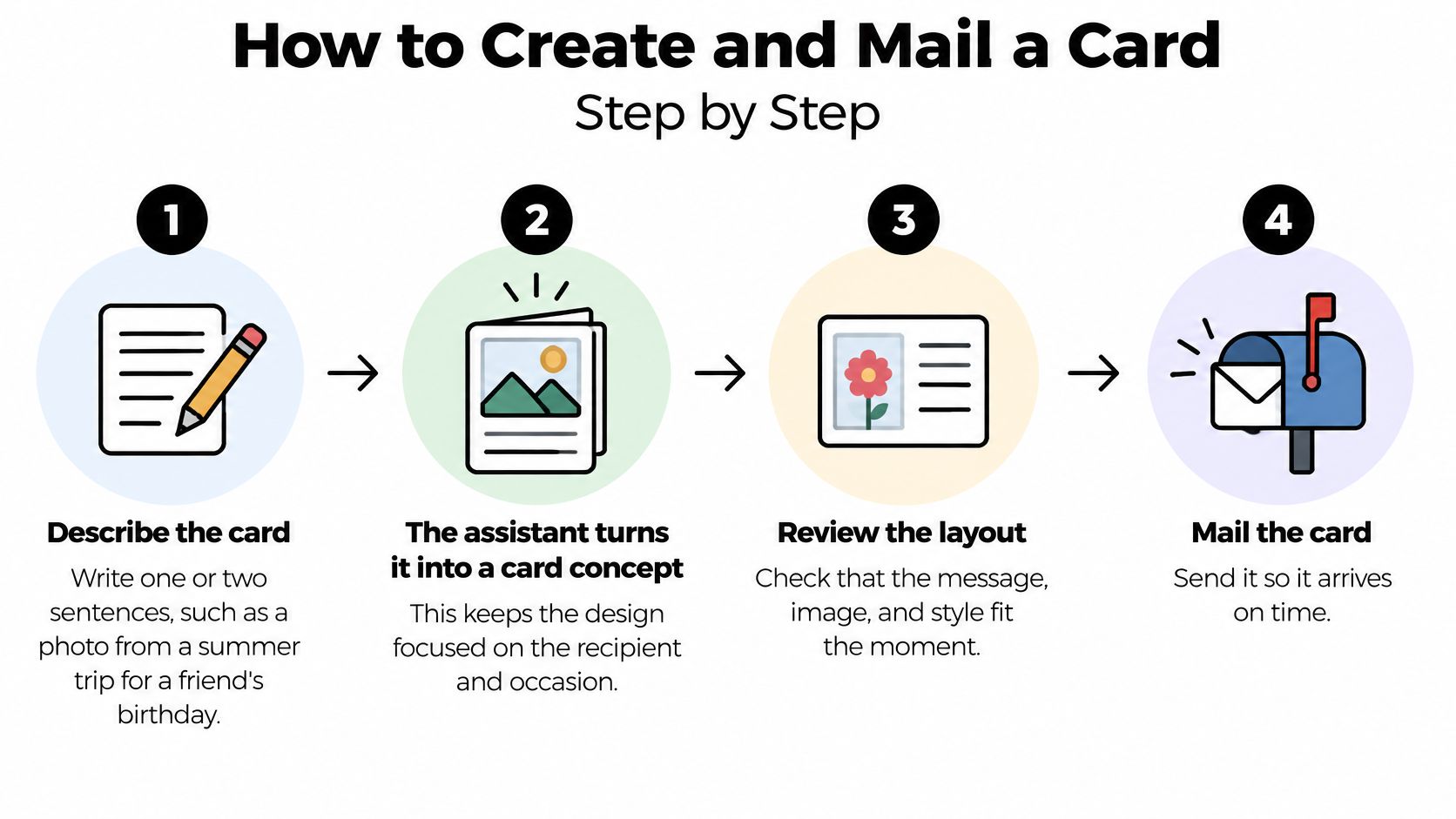
- Describe the card in one or two sentences. Try "a photo from a summer trip for a friend's birthday." The assistant turns that intent into candidate wording and art, so the design stays on the person and the day.
- Pick a catalog design or build custom art. Upload a JPEG, PNG, or WebP photo, or use generated art. Editing keeps the original saved, so you can go back. Photo layouts are spelled out in this guide to personalized greeting cards with a photo.
- Write the inside message yourself. The message is typeset separately from any text sitting in the image. The words you approve are the words that print, which matters when generated art includes unreadable lettering.
- Enter the address and confirm coverage. We mail to U.S. states and Washington, DC, except New York State. U.S. territories and military addresses are not supported. An unsupported destination stops the order before you pay.
- Review the full preview. Look at the design, the recipient, and the total with tax. Nothing is charged at this point.
- Approve the exact card and pay. You choose a design, approve the exact card and delivery address, and then pay securely. Printing is handled by Cardly, which prints each card and mails it to the recipient, and the approved card goes to Cardly only after payment is confirmed.
- Track the order against an estimate. You get an arrival window and order status, not a promised day. If the window looks tight for the occasion, don't approve yet.
Nothing is printed until you approve the card and the payment clears. That pause is what prevents a costly surprise.
You can also build and order the card on our site without an assistant. Buying extra artwork generations does not approve or send anything. Only the paid, approved card moves to print.
Problems With a Card and How to Fix Them
Most snags show up before checkout or right after the envelope arrives. Match the problem, then use the fix in that row. Don't start the whole card over unless the row says to.
| Problem | Likely cause | Fix |
|---|---|---|
| Card held before checkout | Automated screening flagged the composition | Revise the design or message and resubmit for review |
| Card damaged on arrival | Print or handling fault | Free reprint or full refund, the customer's choice |
| Card misprinted | Print quality problem | Free replacement with printing and standard postage included |
| Card differs from the approved preview | Print error or mismatch with approved preview | Free reprint or full refund, the customer's choice |
| Address not accepted | Destination outside coverage | Choose a supported U.S. address before approving |
| Need a second card | One card per approved order | Place a separate approved order |
Held cards and bad prints
Automated screening may hold a card composition for merchant review before checkout, and a declined card can be revised. Change the wording or the artwork and resubmit. You are not thrown back to a blank page.
If a card is damaged, misprinted, or materially different from the approved preview, you can choose a free reprint or a full refund. A replacement includes printing and standard postage at no cost. A print-quality refund returns the paid value allocated to that card, including applicable tax. Other cards in a pack are not refunded, and a reprint uses no extra credit.
Address blocks and extra cards
Check coverage before you approve. An address outside the supported states, including New York State, territories, and military addresses, blocks the order. Quantity is limited to one card per approved order, so a second recipient means a second approved order. That keeps each preview, address, and total separate instead of tangled in one checkout.
Choose Your Occasion and Send Your First Card
Go back to the occasion table, find the row, and count back from the date the card should arrive. That date, not the design, tells you whether mail still fits.
One personalized folded card costs $9.99, including the envelope and domestic postage, plus any applicable tax shown before purchase. Card credits never expire and include printing, an envelope, domestic US postage, and applicable sales tax, calculated when the destination is known. You also get 20 free artwork generations without signing up or logging in, shared across your cards.
Start with a low-stakes send, such as a thank-you or a birthday that still has a few days of buffer. You learn the preview before a bigger day. Reread the wording once, then approve before the lead time closes. Approval is the point. Nothing ships until you approve and pay.
Mail This turns a short idea into a personalized folded card, prints it, and mails it inside the United States after you approve the design, the address, and the total. If you already know the occasion and the send window, you can start from a sentence instead of a blank store shelf. Visit Mail This and send the first card while the lead time is still open.