U.S. market-dominant mail volume fell 46%, from 201 billion pieces in fiscal year 2008 to 109 billion in fiscal year 2023, according to the USPS Office of Inspector General analysis of historical mail volume trends. That decline reframes the search for Paperless Post alternatives. Digital delivery isn't a novelty competing with paper. It's the default, and paper now has to earn its place.
That doesn't make the choice simple. A sender planning a wedding needs guest counts and reminders. A sender thanking a mentor needs one message to land well. A sender writing to a parent who rarely opens email needs reliability, not speed. Ranking services by design libraries or headline prices misses those differences. Total sender effort, recipient reliability, accessibility, and data handling decide whether a message is received, understood, and kept.
Table of Contents
- Paperless Post Alternatives at a Glance
- What Senders Really Want From a Replacement
- Seven Criteria That Decide the Choice
- Digital, Hybrid and Physical Options Side by Side
- Where Digital Delivery Fails Recipients
- Privacy Trade-offs Between Digital and Physical Cards
- When Mail This Fits and When It Does Not
- Choose the Right Alternative Before You Send
Paperless Post Alternatives at a Glance
People usually search for Paperless Post alternatives for a practical reason, not because digital invitations have stopped working. Paperless Post suits event invitations and RSVP collection. Friction appears when you want a personal card rather than an event page, a physical keepsake, simpler pricing, or no guest account flow at all. At that point you're not choosing a different template. You're choosing a different type of service.
Three types cover most of the market. Digital-only platforms send an email or link and handle guest tools online. Hybrid services start digital but let you print and mail cards for selected recipients. Full-fulfillment physical services design, print, address, and mail each card for you. Each type solves a different job, and each creates a different kind of follow-up work.
Three Types of Paperless Post Alternatives at a Glance
| Option type | Examples | Typical cost model | What the recipient receives | Best first use |
|---|---|---|---|---|
| Digital-only platform | Evite, Canva invitation templates, Lemonvite | Free tier with paid upgrades for premium templates or guest features | Email or link to an online card | Event invitations and RSVP collection |
| Hybrid service | Digital invitation sites with print-and-mail add-ons | Digital plan plus per-card print and postage when mailed | Email link, or a printed card for selected guests | Mixed guest lists where some people need paper |
| Full-fulfillment physical card service | Mail This | Fixed per-card price including envelope and domestic postage, plus applicable tax | Folded physical card delivered by USPS | Personal birthday, thank-you and everyday notes to individuals |
Don't compare per-card prices directly across these rows. A digital tier pays mainly for templates, guest management, reminders, and tracking. A physical service pays for printing, an envelope, addressing, and postage. A low digital price can still cost you time if messages land in spam or guests don't respond. A higher physical price can be reasonable for one important recipient and wasteful for a large guest list.
The type you choose sets the physical outcome before you pick a design. Use the table as your first filter, then judge services within that type.
If the recipient must hold something, a digital-only platform can't meet that requirement no matter how polished the animation looks. If you need RSVPs by Friday, a mailed card can't provide that visibility. Start with the outcome, not the brand.
What Senders Really Want From a Replacement
A replacement should reduce the sender's total work without making delivery less reliable for recipients. Some senders want to control costs, create a personal message, manage event responses, avoid design work, or reach someone who rarely checks email. These goals can conflict: a quick digital send may require follow-ups, while a physical card takes more setup but arrives as an object the recipient can keep. Decide what success means before choosing a service.
Three Jobs That Point to Different Services
Event coordination calls for guest counts, RSVP tracking, reminders, and quick updates when details change. Digital tools can reduce the effort of managing a large group. Their convenience depends on recipients seeing the message, however. An email that goes to spam or a guest who misses a link can create follow-up work.
Relationship notes serve a different purpose. Thanks, sympathy, birthdays, and congratulations are usually one-to-one gestures, not requests for a headcount or another task. A physical card adds something the recipient can hold and keep. Digital delivery is faster, but may feel less personal, and an email or text can be overlooked among routine messages.
Mixed households may include colleagues who respond to email, relatives who prefer text, and an older family member who needs paper. A hybrid service lets the sender choose a channel for each person, but creates more work: the sender must manage separate delivery methods and check whether messages reached their intended recipients.
Why Digital Is the Baseline
Email, texting, and social media have made routine communication fast and inexpensive. Physical cards therefore need a specific purpose, such as giving a personal message a tangible form or reaching someone who is difficult to contact online. They are a poor fit for frequent updates or time-sensitive coordination, where delivery and response tracking matter more than the object.
Digital delivery also has limits beyond whether a recipient checks email. Links may be filtered as spam, and an online card can be harder to use for someone with accessibility needs or limited confidence with digital tools. A mailed card avoids inbox filtering, though it takes longer to prepare and deliver. The right replacement depends on who must receive the message, how reliably they can access it, and how much follow-up the sender is willing to do.
Sorting rule: If success means knowing who is coming, choose for coordination. If success means one person feels remembered, choose for presence.
Seven Criteria That Decide the Choice
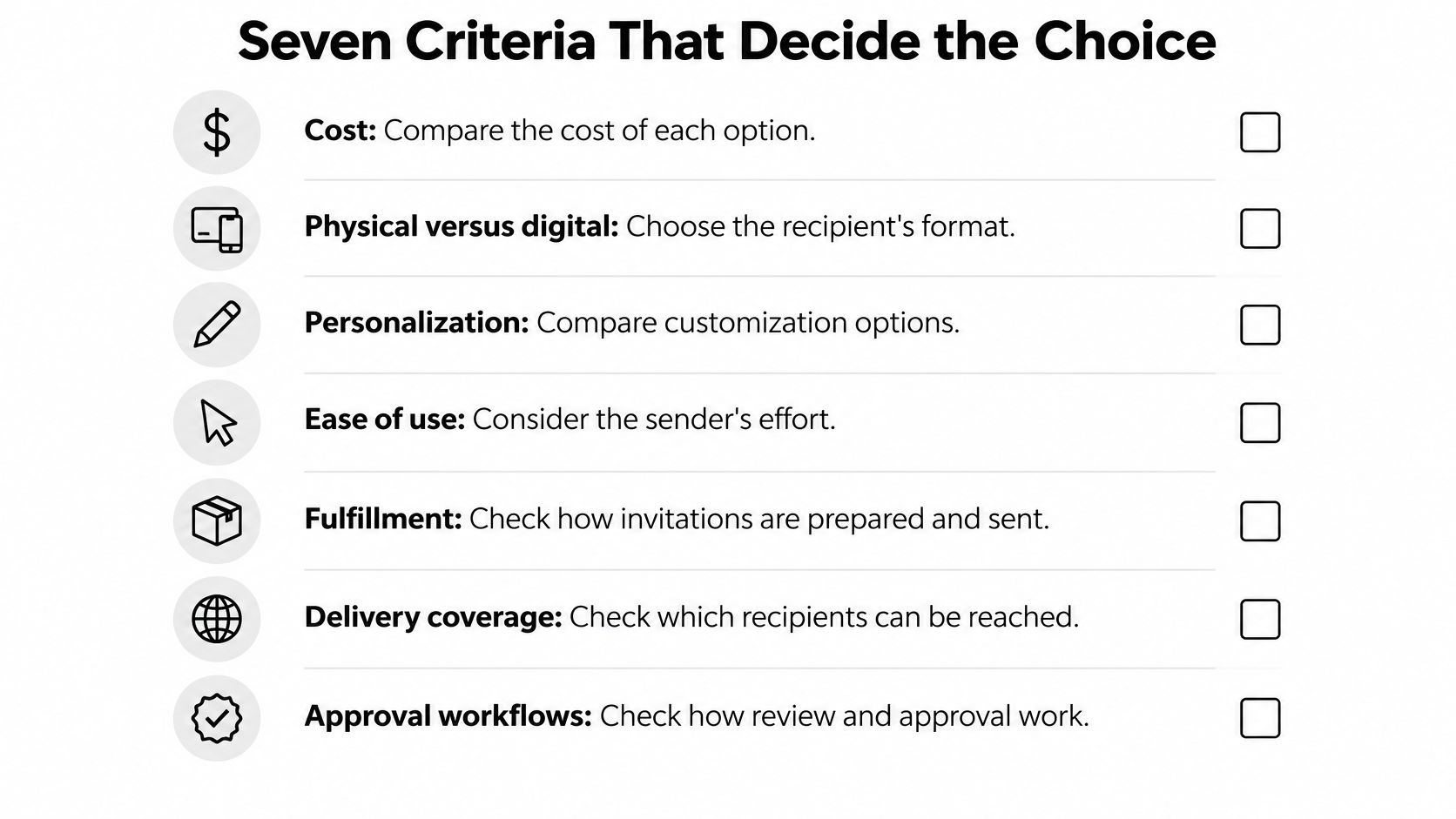
Use these seven criteria in a practical decision-making order. Each one comes with a question to ask and a red flag that should slow you down. Readers comparing related card services can also apply the same checklist to SendOutCards alternatives and their fulfillment models.
Cost and Format
1. Cost. Ask whether pricing is per card, per guest, per event, or per month, and whether envelopes, postage, and tax are included. For digital services, check which guest features sit behind upgrades. A red flag is a headline price that excludes postage, premium templates, or the guest tools you need. Compare the total for your real list, not the smallest advertised tier.
2. Physical versus digital. Ask what the recipient holds or opens. Is it a link, an HTML email, a downloadable image, or a folded card in the mailbox? That answer affects everything downstream, including accessibility, sharing within a household, and whether the message can be kept. A red flag is vague language about delivery that never states the final format clearly.
Personalization and Effort
3. Personalization. Check whether you can use your own photos, edit the exact wording, and choose or generate artwork. If AI artwork is involved, confirm that your message is typeset separately rather than embedded as image text, because generated lettering can be unreadable. A red flag is a template that lets you change colors but not the words that matter.
4. Ease of use. Count the steps from idea to sent, including account creation, address entry, proofreading, and payment. Then count what happens after sending. Digital ease can evaporate if you're chasing bounces and unanswered RSVPs for a week. A red flag is a quick checkout followed by unclear status information.
Fulfillment, Coverage and Approval
5. Fulfillment. Confirm who prints, addresses, packs, and posts a physical card, and whether you can see order status. For digital sends, confirm who handles bounces and retries. A red flag is a service that takes payment but doesn't explain the handoff to email delivery or postal production.
6. Delivery coverage. Check which states, territories, and military addresses are supported before you write anything. Email reaches any valid address in principle, while physical coverage depends on the fulfillment network. A red flag is an address form with no coverage validation until after payment.
7. Approval workflows. Confirm that you see the final design, recipient, and total before payment, and that nothing sends without your explicit confirmation. This matters most when an assistant helps draft wording or artwork. A red flag is a send button with no complete preview.
Digital, Hybrid and Physical Options Side by Side
Read the comparison by column first. Each column describes how an option type typically behaves, not what one brand promises in its marketing. Then read across a row when a single criterion matters more than the rest, such as delivery timing for a last-minute message or coverage for a specific address.
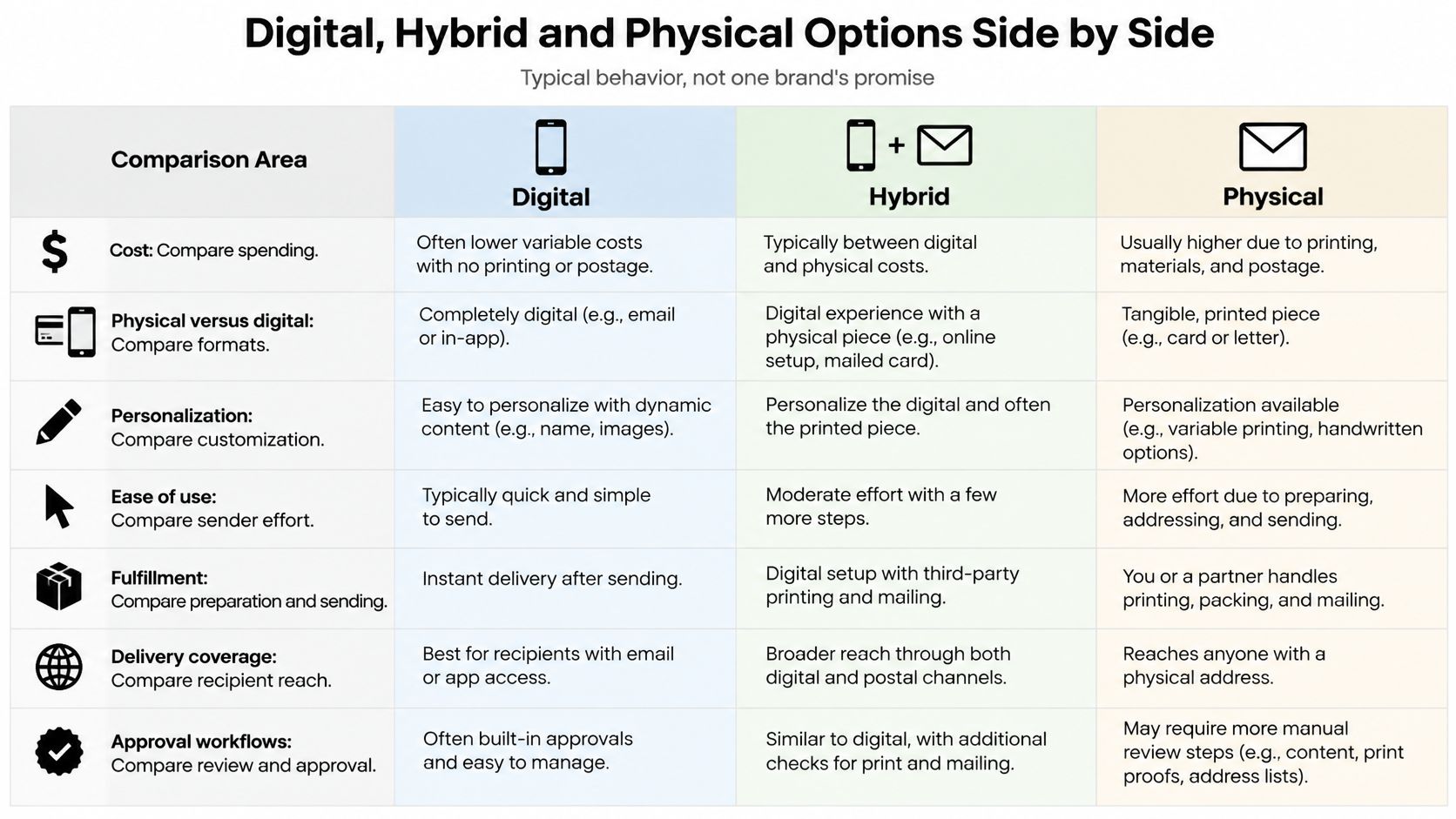
Option Types Compared on the Same Criteria
| Criterion | Digital-only platform | Hybrid service | Full-fulfillment physical service |
|---|---|---|---|
| Typical cost per recipient | Free to low-cost tiers, paid upgrades for guest features | Digital plan plus per-card print and postage | Fixed per-card price including envelope and domestic postage, plus tax |
| What the recipient gets | Email or link, viewed on screen | Email link or printed card, chosen per guest | Physical folded card delivered by USPS |
| Personalization | Templates, own photos, RSVP fields | Templates plus printed options | Own photos or AI artwork, exact message approval, typeset text |
| Sender effort after sending | Reminders, bounce fixes, RSVP follow-up | Split list handling by recipient type | Address and approve once, no printing or postage work |
| Delivery timing | Minutes, subject to inbox placement | Depends on the channel chosen | Estimated arrival window, no guaranteed date |
| Address and location coverage | Any email address | Email plus mailing address for print | Mail This, U.S. states and Washington DC; New York State, territories and military addresses not supported |
| Preview before sending | Varies by platform | Varies by platform | Full preview of design, recipient and total before payment |
| RSVP and event tools | Usually built in | Usually built in for the digital side | Not a focus; suited to personal notes |
Mail This illustrates the physical column with specific terms. It charges a fixed $9.99 per card including the envelope and domestic postage, plus applicable tax shown upfront. The folded card measures 125 by 175 mm, you approve a full preview before payment, and arrival is an estimated window rather than a guaranteed date. It isn't an event RSVP tool, and it doesn't offer same-day delivery. Those limits aren't footnotes. They define the category.
The worked example shows why context controls value. Five thank-you cards at $9.99 each come to $49.95 before any applicable tax. That can be sensible if each note goes to a client, mentor, or friend you'd otherwise thank with a store-bought card and a trip to mail it. A 60-guest wedding is a different calculation. A digital platform can coordinate that list on a free or low-cost tier unless premium guest features are needed, while mailing every guest an individual physical card would cost far more and still leave RSVPs unmanaged.
Digital-only options win on guest coordination and speed. Hybrid services win when one list mixes email readers with paper recipients, because you don't have to split the event across unrelated tools. Full-fulfillment services win when each card matters individually and you don't want to print, address, or post anything yourself. For senders weighing artwork and message control, a custom greeting card workflow with preview and approval shows what that physical process involves.
No column wins overall. Each one trades money, speed, sender effort, and certainty in a different proportion.
Where Digital Delivery Fails Recipients
Email acceptance does not guarantee that an invitation reaches a recipient's attention. In a 2025 benchmark, delivery rate was 98.16%, while inbox placement was 84.3%, according to MailerToGo transactional email engagement statistics for 2025. A message can be accepted by a receiving server yet end up in spam or another folder. On a short guest list, personal follow-up can close that gap. With more recipients, it adds work and makes RSVP tracking less dependable.
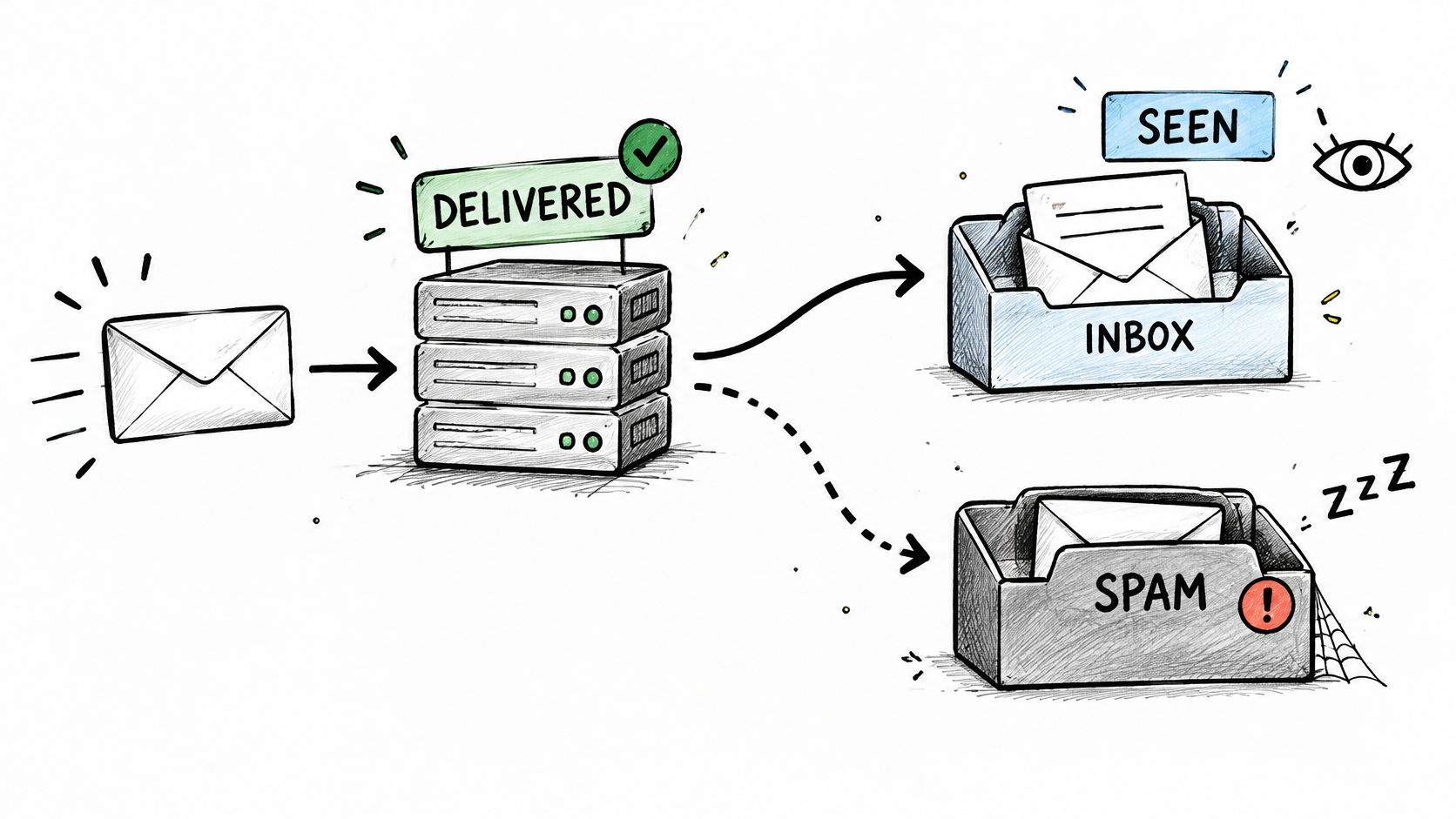
Reviews on Yelp's Paperless Post listing in New York can suggest issues to test, such as spam placement, unopened invitations, unclear RSVP status, or complications when multiple people share an address. A review page cannot establish how common these problems are. Treat them as checks for a trial send, not as a measured failure rate.
Before choosing a service, ask whether it reports inbox placement by mailbox provider, distinguishes transactional email from marketing traffic, and makes bounces and complaints visible. Check SPF, DKIM, and DMARC alignment, then test representative messages in Gmail, Outlook, and Yahoo using clean recipient data. These steps may expose delivery risks, but they cannot guarantee that every guest will see or act on an invitation.
Accessibility creates another point of failure. A card made entirely of one image may leave screen-reader users, or recipients whose email clients block images, without useful content. The Qualibooth email accessibility guide recommends descriptive alt text for informative images, empty alt attributes for decorative images, selectable text, and contrast of at least 4.5:1 for normal text and 3:1 for large text.
Physical cards bypass spam filtering and image blocking, but they are not a universal fix. Senders still need accurate addresses, and recipients must wait for delivery. The practical comparison is total effort: digital sending is fast, but weak placement or inaccessible design can require follow-up; physical delivery avoids those email failures while adding address management and postal timing.
Privacy Trade-offs Between Digital and Physical Cards
Privacy differs by model, not just by brand. Digital invitations collect data because they need to deliver messages, record responses, and show hosts who has opened or answered. Physical cards avoid some of that tracking, but they require a postal address and pass that address through production and mailing. Neither model is private in an absolute sense.
Paperless Post offers a useful example of the nuance. Its terms of service for guest participation and account history state that guests may RSVP, comment, upload photos, or privately message hosts without registering. Account history and archived events can remain available until deletion is requested or retention is otherwise justified. That reduces account friction for guests, which is helpful. It doesn't mean no data is collected when they interact.
No account required does not mean no data collected. Those are separate promises, and comparison pages often blur them.
Five Questions for Any Provider
- Recipient data minimization: What recipient data is collected, and how much is needed to deliver this specific message?
- Tracking defaults: Is email-open or click tracking on by default, and can you turn it off or limit it?
- Retention and deletion: How long does event or order history remain available, and how does deletion work in practice?
- Address handling: Who receives email or postal addresses, and are they shared with fulfillment or delivery partners?
- Sender approval: Can you approve exactly what is transmitted, including the final recipient list and message content?
For a physical card, the absence of email-open analytics is a real difference. Nobody gets a dashboard showing when your aunt opened her birthday card. But the recipient's postal address is shared with the production and mailing partner, and the card itself travels through the postal system. For Mail This, production and mailing are handled by Cardly, so the address passes to that fulfillment step. Read the applicable policy before sending anything sensitive, and don't put information in a card that you'd be uncomfortable having handled by a printer.
The practical conclusion is modest. Choose digital when response data helps you run an event and guests understand that interaction is recorded. Choose physical when you prefer not to generate open tracking for a one-to-one note and you're comfortable sharing a postal address for fulfillment. Privacy-conscious senders should compare data lifecycles, not slogans.
When Mail This Fits and When It Does Not
A physical card can avoid inbox and spam risk, but it shifts the delivery question to whether the address is supported and the card arrives in time. The best fit depends on the recipient, the message, and how much follow-up the sender can take on.
Recommended Option by Situation
| Situation | Best fit | Why it fits | Mail This suitable? |
|---|---|---|---|
| Birthday card to a close friend | Full-fulfillment physical card | The physical object carries a personal gesture | Yes, for supported U.S. addresses |
| Thank-you note to a client or mentor | Full-fulfillment physical card | Fixed price, exact wording approval, and a full preview | Yes |
| Wedding or party with 60 guests | Digital-only platform | RSVP tracking, reminders, and quick updates support coordination | No, it is not an RSVP tool |
| Older relative who rarely checks email | Full-fulfillment physical card | Avoids reliance on an inbox and reduces spam-folder risk | Yes, if the address is in a supported state |
| Recipient in New York State | Digital-only platform or another mailing service | Mail This does not ship to New York State | No |
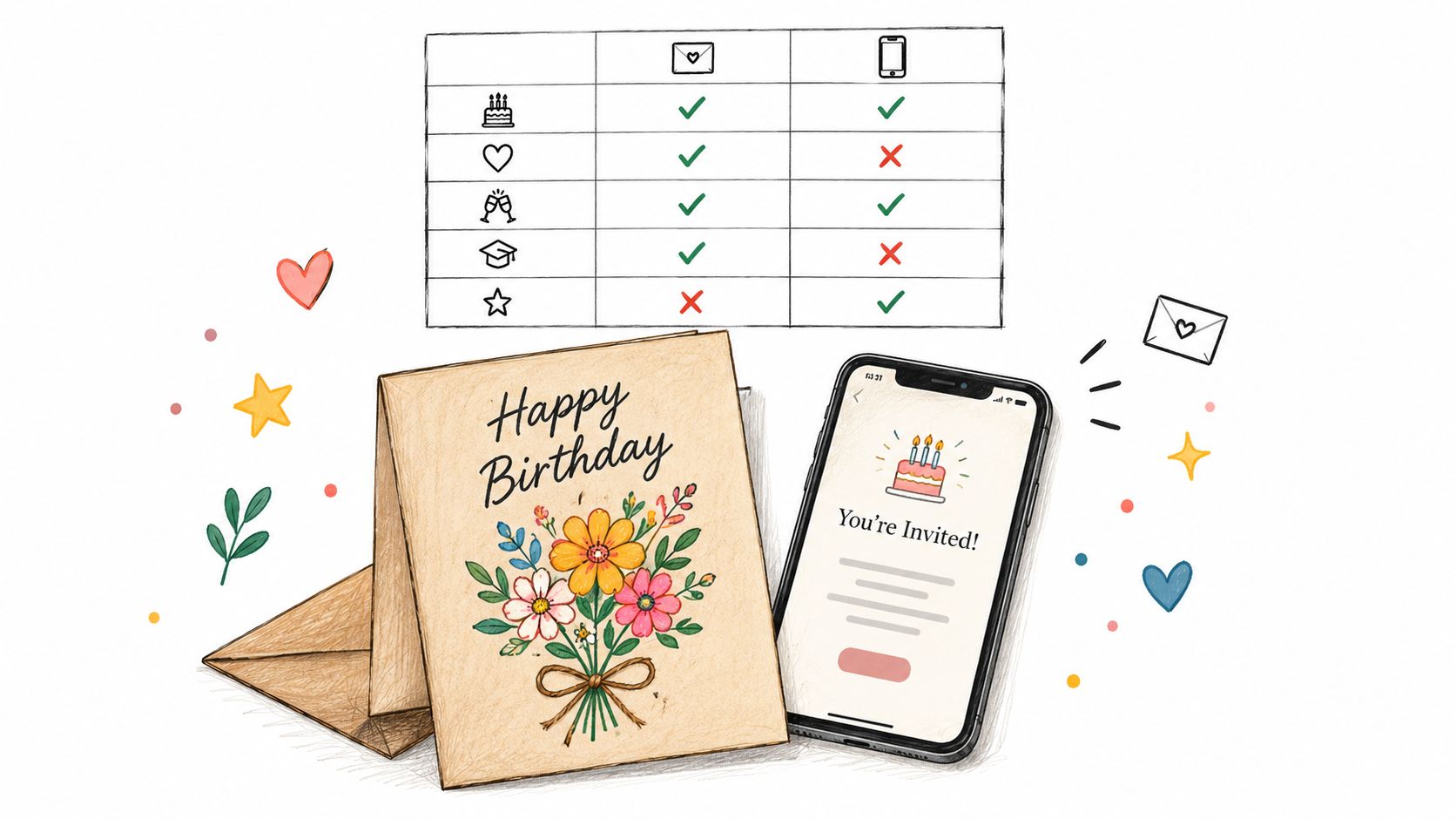
For a birthday greeting, the card itself is part of the message. A recipient can keep it on a desk or shelf, while an email or mobile message may be harder to find later. A client or mentor thank-you also suits physical delivery when the sender wants to approve the final wording and preview the whole card without buying, writing, stamping, and mailing it by hand. For a practical overview of how to send a card in the mail without handling postage yourself, consider what the fulfillment service handles and what the sender still needs to check.
Mail can receive attention because it arrives as a physical item that recipients handle at home, rather than competing with email and spam filters. That does not guarantee when a card will be opened. It does make a mailed greeting a reasonable option for someone who rarely checks email, provided the postal address is accurate and the recipient can access their mail.
A wedding or party with 60 guests has different demands. Organizing guest counts, meal choices, reminders, and updates requires response tracking that a mailed card does not provide. A digital platform is a better coordination tool; physical cards can still suit a small subset of guests who need paper. This split reduces follow-up work compared with managing every response manually, while preserving a paper option for recipients who may miss an email.
Mail This also has limits that can outweigh the format's advantages. It offers one free AI artwork generation after sign-in, with additional packs of five for $1.49 after card prepayment. Delivery timing is estimated, not guaranteed, so use another option when arrival by an exact date matters. New York State, U.S. territories, and military addresses are not supported. If the recipient falls outside the service area or the message has a firm deadline, choose another service rather than relying on a workaround.
Choose the Right Alternative Before You Send
Use this procedure for each message or event, not once for every future send. The right answer can change when the recipient, deadline, or need for a response changes.
- List every recipient. Note whether each person needs an RSVP, a reminder, event details, or a keepsake message.
- Split the list. Separate event guests from personal recipients before you choose a platform or compare prices.
- Choose digital for event guests. Pick a digital-only platform when tracking and updates matter, then check its guest-data, tracking, retention, and deletion terms.
- Choose physical for low-email recipients. Use a full-fulfillment service when someone rarely checks email, and confirm the postal address is accurate and in a supported state.
- Use hybrid for mixed lists. Send digital invitations to responsive guests and printed cards only to people who need paper, rather than paying to mail the entire list.
- Confirm the full total. Before sending, verify the cost per card or guest including tax, upgrades, printing, and postage where applicable.
- Approve the exact output. Check the design, wording, recipient, and total in the final preview. Don't pay if any of those elements is hidden.
- Plan around timing realistically. Track digital bounces and responses promptly. For physical cards, allow the estimated arrival window and don't promise a fixed delivery date.
For a single personal card, the concrete next step is simple. Write the message, choose a photo or generated artwork, approve the preview, and pay the per-card price only after confirming the recipient is in supported coverage. For an event, start with the guest workflow instead and let the design decision come second.
If your next message is a personal birthday, thank-you, or everyday note rather than an RSVP-managed event, Mail This can turn your approved wording and artwork into a folded physical card that's printed, addressed, and mailed for you. Visit the service to write your message, review the full preview and total before payment, and send one card without buying stationery or postage yourself.