You're standing in the card aisle, or maybe staring at a blank screen, with a birthday, thank-you, or thinking-of-you moment that matters enough to send something real. The problem isn't that cards don't exist, it's that the ones in front of you say almost what you mean, but not quite. A custom greeting card fills that gap by giving you a middle path between store-bought and fully handmade.
That middle path matters more now because the full journey has changed. The useful question isn't just what the card looks like, it's how the idea becomes a preview, gets approved, turns into a printed piece, and arrives in the mailbox without the sender having to manage every step. If you've ever thought, “I want this to feel personal, but I don't want to craft everything myself,” this guide is for you.
Table of Contents
- When Off-the-Shelf Just Doesnt Cut It
- What a Custom Greeting Card Actually Is
- Comparing Your Creation Options
- How the Order Approval and Mailing Flow Works
- Writing Messages and Choosing Images That Land
- Pricing Shipping and What the Total Really Adds Up To
- Keeping the Gesture Yours in an AI-Assisted Flow
- Putting It All Together for Your Next Card
When Off-the-Shelf Just Doesnt Cut It
You know the feeling. You find a nice card, then hit one line that doesn't fit, one image that feels off, or one joke that sounds like it was written for a crowd instead of a person. That's usually the moment people either settle for “close enough” or abandon the idea altogether.
A custom greeting card gives you another option. It lets you start with the occasion, the recipient, and the tone you want, then build a physical card around that instead of forcing your message into a generic template. That matters for birthdays, thank-yous, sympathy notes, and everyday check-ins, where the point is less “perfect design” and more “this was made for you.”
A third path between buying and crafting
The easiest way to think about it is this, a store-bought card is a greeting written for anyone, and a blank notecard is a blank canvas. A custom card sits in the middle, where the wording, artwork, and envelope are prepared for one person and one moment.
That middle path is why this format feels useful to first-time senders. You don't need design software, but you also don't have to accept a message that feels borrowed. If you want a quick starting point on card formats, the overview at Types of Greeting Cards is a helpful companion.
Practical rule: if the message changes meaning when you replace the recipient's name, it's probably the right kind of card to customize.
What you can expect from this guide
The rest of the process usually comes down to a few decisions. You'll decide what makes a card “custom,” which creation path matches your time and comfort level, how the approval step protects your wording, how to balance message and image, what the actual price adds up to, and how the card gets mailed in the United States. If you've been wondering about AI help, postal rules, or whether the final card still feels like yours, those questions show up below.
What a Custom Greeting Card Actually Is
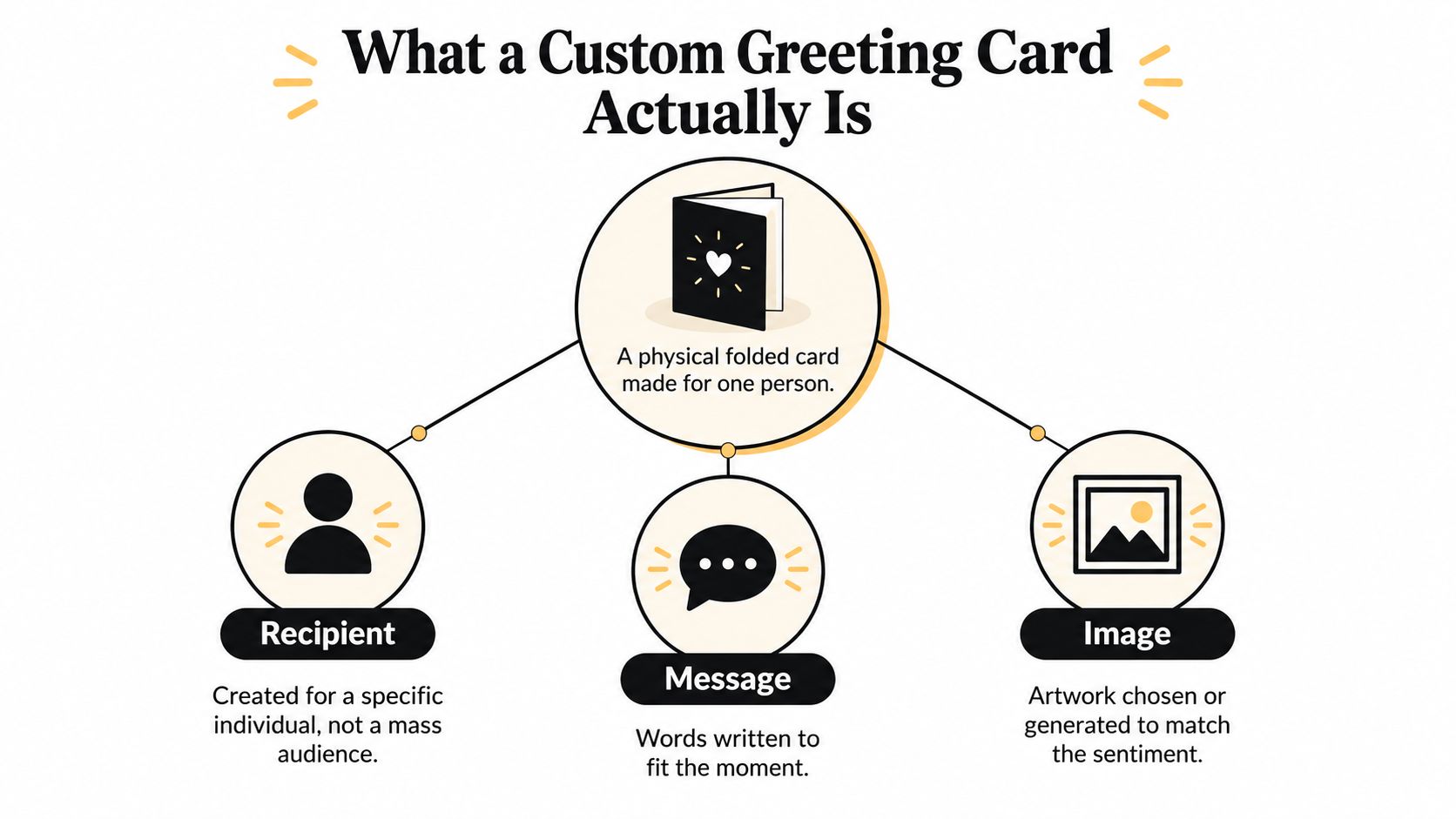
A custom greeting card is a folded physical card made for one specific person, not a mass audience. That can mean the message is written just for them, the artwork is chosen just for them, or both are built together. It is different from a store card, where you pick from something already printed, and different from a handmade craft, where you personally assemble every material.
The three parts that matter most
Think of a custom card as having three building blocks, message, image, and envelope. The message is the words inside, the image is what appears on the front or cover, and the envelope is the part that gets the card through the mail in usable shape. That last piece matters more than many first-time senders expect, because a pretty card still has to meet U.S. mailing conditions to travel well.
A folded format is common because it gives more room for both a cover design and a typeset interior note. A flat card can work too, but folded cards usually make the “front says one thing, inside says another” structure easier to understand and easier to mail. For U.S. postal use, the finished piece has to be thought through as a whole, not just as a pretty rectangle.
Custom, personalized, handmade
These terms overlap, but they're not identical. Personalized usually means a name, photo, or short note was added to a template. Custom usually means the card was created around a specific occasion or recipient, with more control over wording or artwork. Handmade means the maker physically assembles it, which can be beautiful, but also slower and less predictable.
That distinction matters when you compare services. A personal-looking template may be enough for a quick thank-you, while a custom card makes more sense when the message itself needs to sound like you. The more you care about exact wording, the more useful it is to know whether the service treats the message as editable text or as part of a static design.
Comparing Your Creation Options
Three practical routes cover most card makers. You can do it yourself, use a template-based service, or use an assistant-led flow that helps draft both the wording and the artwork. Each route can produce a thoughtful card, but they ask for different amounts of time, skill, and follow-through.
The trade-offs are not equal
| Option | Effort | Design Skill | Time to Mailbox | Control | Mailing Handled |
|---|---|---|---|---|---|
| Full DIY | Highest | High | Depends on your own printing and mailing | Highest | Usually no |
| Online template service | Moderate | Low to moderate | Depends on printing and whether you mail it yourself | Medium | Usually no |
| Assistant-led service | Lowest to moderate | Low | Depends on production and postal timing | High at the approval stage | Yes |
A DIY approach gives the most freedom, but it also gives you every task. You have to write, design, print, address, stamp, and mail. Template services reduce design friction, but they still leave you to handle the mailing step most of the time, and that's often where good intentions fade.
The most common failure isn't bad design, it's the card that never leaves the table.
Which option fits which sender
If you care most about total creative control, DIY still makes sense. If you want something polished with minimal learning, templates are practical. If you want help turning a rough thought into a finished, mailed card, assistant-led services fit the shape of that job better. For readers comparing workflows for real-world use, Mail This is one example of an assistant-led option that takes the card from chat to preview to domestic mailing.
How the Order Approval and Mailing Flow Works
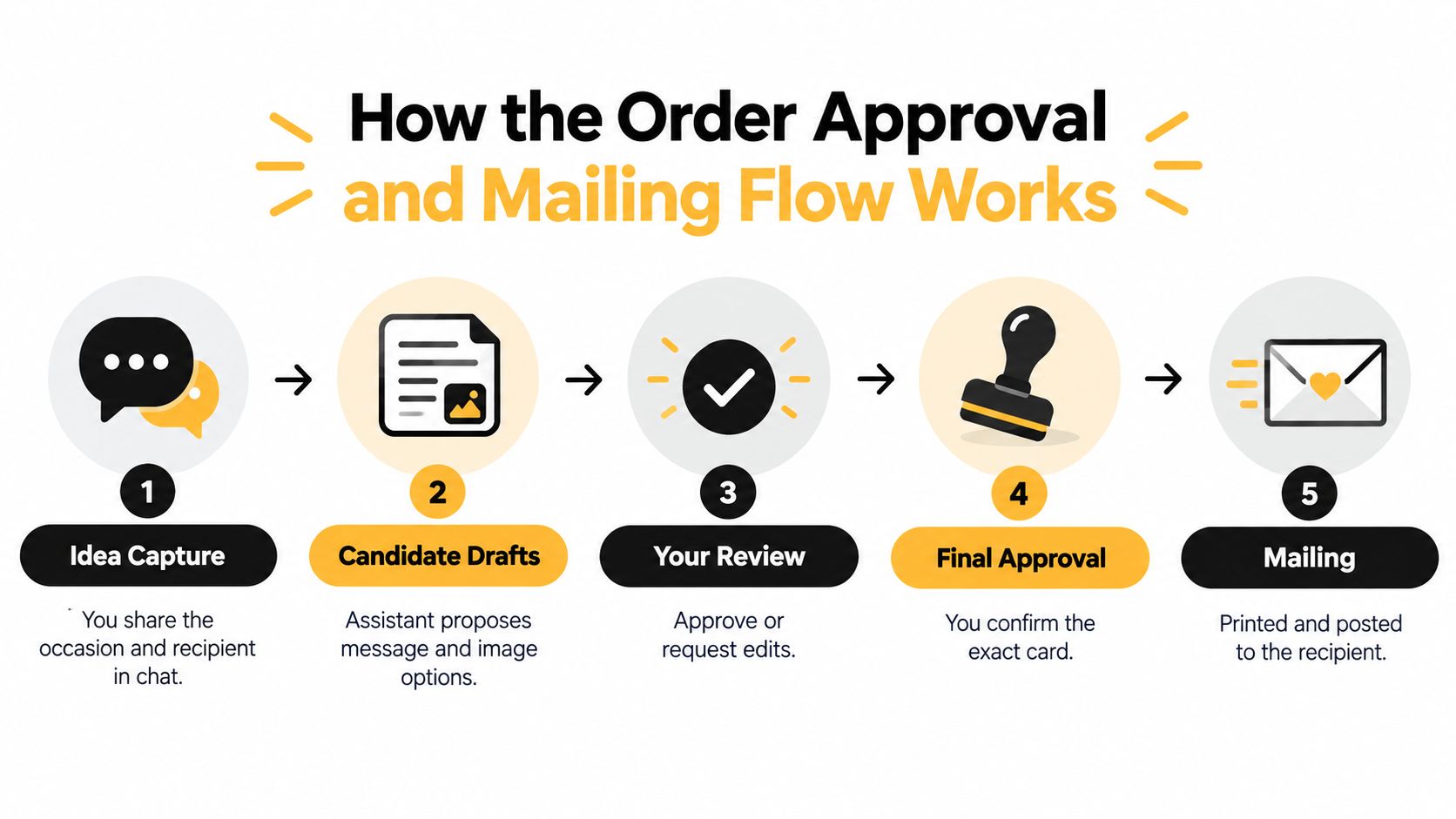
The approval-first flow exists because the small mistakes are the expensive ones. A wrong name, a clipped photo, or a message that sounds slightly off can ruin the whole experience once the card is printed. The point of the workflow is to catch those problems before paper is involved.
From idea to preview
The process usually starts with a chat. You describe the occasion, the recipient, and the tone you want, then the service proposes candidate wording and image ideas. If you want to use your own photo, you upload it. If you want art instead, the system generates or suggests it.
Then the preview appears. That preview should show the full card, the envelope, the recipient details, and the total cost before you pay. The preview is the main safety gate, because it lets you spot wrong spelling, awkward spacing, or an image that doesn't match the mood.
Why the gates matter
Each handoff prevents a different failure. The preview gate catches bad names and bad photos. The approval gate stops unintended wording from being sent. The separate typesetting step prevents text from being trapped inside artwork where it becomes hard to read. The fulfillment gate keeps the card from dying on a desk after the design is finished.
The USPS piece matters here too, because the mailing side is not an afterthought. A card that looks good on screen still has to move through real postal handling, so the service has to respect the physical rules of envelope, shape, and address placement to get the job done.
Practical rule: if you wouldn't sign your name to the exact preview, don't approve it yet.
What status updates are for
After approval and payment, the file moves to production, where printing, packing, addressing, and posting happen. Status updates matter because they tell you the card is moving, not stalled. For first-time senders, that visibility is part of the value, since it replaces the usual “Did I mail it yet?” uncertainty with a clear handoff from your approval to the postal system.
For a basic mailing walkthrough that pairs well with this flow, see How to Send a Card in the Mail.
Writing Messages and Choosing Images That Land
A good card doesn't need dramatic language. It needs a message that sounds specific enough to belong to one person, and an image that supports that feeling instead of fighting it. If the recipient can tell you didn't just grab the nearest generic line, you're on the right track.
A simple message shape that works
Start with one specific memory, one feeling, and one wish. That might sound like, “I still laugh about the time we got lost on the way to dinner, I'm really glad you're in my life, and I hope this year brings you a little more ease.” It doesn't have to be poetic, it just has to sound like it came from a real person.
Keep the note short. People often write more than they need to, then find the typeset version looks smaller than they expected. Two to four short lines usually feel cleaner than a long block of text, especially when the design already has a strong front image.
What to use on the front
If you're using your own photo, JPEG, PNG, and WebP are the formats to think about. A real photo works well when the moment itself is the point, like a family snapshot, a pet picture, or a travel memory. AI-generated artwork works better when you want a mood or concept rather than a literal scene.
A few simple do-and-don't checks help here:
- Do name the shared moment. A detail from real life feels warmer than a broad compliment.
- Do pick one clear emotion. Warmth, gratitude, sympathy, or celebration works better than trying to say everything at once.
- Don't overload the front. If the image and the message both compete for attention, neither lands well.
- Don't lean on borrowed lines unless they truly belong to both of you. A card should sound like your relationship, not a quote database.
The useful part of independent typesetting is that the wording is rendered separately from the artwork. That means you can change the note without rebuilding the image, or swap the image without touching the text. For senders, that separation is the single most practical control to understand.
For another reference point on card-making choices, Greeting Cards is a useful internal read.
Pricing Shipping and What the Total Really Adds Up To
A card price on its own doesn't tell you what you'll spend. The cost includes the card itself, any optional artwork help, tax, and whether postage is already built in. If you're comparing services, you want the total landed cost, not the headline number.
What's usually included and what isn't
With Mail This, the base price is $9.99 per card, and that includes the envelope and domestic postage, with applicable tax shown upfront. One artwork generation is free after sign-in, and additional packs of five generations are available for $1.49 after card prepayment. Those extra generations matter only if you want more creative attempts before you settle on the final look.
The shipping side has its own limits. Delivery is domestic only, it covers U.S. states and Washington, DC, and it does not currently support New York State, U.S. territories, or military addresses. There's also no guaranteed delivery date, only an estimated arrival window that depends on production and postal distance.
What can quietly raise the bill
Watch for hidden multipliers: rush fees, reprints from unapproved wording, and per-recipient charges can turn a simple card into an expensive habit.
The cost traps in any custom card service usually show up when the workflow isn't tight. If you send one card, the total may feel simple. If you send to a list, small per-card charges stack quickly, and any approval mistake can create extra production work.
The practical test is not “Is this the cheapest card?” It's “Does the service remove enough friction that I finish sending?” That's where the value sits, especially for people who would otherwise design something and never get it in the mailbox.
Keeping the Gesture Yours in an AI-Assisted Flow
The quiet question behind AI-assisted cards is not whether a machine helped. It's whether the final gesture still feels authored by you. That concern is real, especially for apologies, sympathy notes, and relationship milestones, where a thin or generic sentence can undercut the whole point of sending a card.
Keep authorship in the message
Start from a real memory or in-joke. Use the assistant to brainstorm, tidy phrasing, or generate image ideas, but edit the final wording yourself so it sounds like your voice. Then approve the exact text before production, because once the card is printed, there's no graceful fix.
AI-generated artwork and AI-written sentiment are not the same risk. A generated image can usually sit in the background, while an untouched automated message can feel hollow. A service that typesets your message separately from the image helps here because it makes the wording the final authority, not an afterthought embedded inside the artwork.
A few guardrails that help
If you want a simple rule set, use this one:
- Start with something only you would remember. That anchors the card in real life.
- Use AI for drafts, not decisions. It can help you get started, but it shouldn't finish the relationship for you.
- Read the note out loud. If it sounds formal in a way you'd never say, rewrite it.
- Disclose assistance if it feels right. Transparency is a choice, not a requirement, but it can matter in close relationships.
The physical steps still belong to you, too. You chose the occasion, approved the wording, and decided to mail something tangible. The service can reduce friction, but it doesn't take ownership of the sentiment.
Putting It All Together for Your Next Card
The easiest way to think about a custom card is to make four decisions in order. First, pick the occasion and the person. Second, choose the creation path that matches how much effort you want to spend. Third, decide how the message and image should work together. Fourth, check the total so the budget feels clear before you approve anything.
The next time you need to send one, keep the sequence simple. Jot down one specific memory, choose between a real photo and AI art, write two to four lines in your own voice, preview everything, approve the exact version, and let the service handle the rest. That rhythm keeps the card personal without making the process heavy.
A good custom card doesn't just look thoughtful. It arrives as a physical object that feels like it could only have come from you.
If you want a simpler way to turn a short thought into a printed card, Mail This takes the approval-first route described above and handles the print, address, and domestic mailing steps for you. If that's the kind of workflow you've been looking for, visit Mail This and try it the next time you want a card to feel personal without starting from scratch.